
What is the TradFi Combo Bot?
The TradFi Combo Bot is a trading tool that provides easy access to traditional financial markets through automated portfolio management. It allows you to build a diversified portfolio of assets, such as commodities, forex, indices, and stock CFDs, using predefined allocations, and automatically rebalances your positions when they drift from their target weights. This helps keep your portfolio aligned with your strategy across different market conditions. For more details, refer to Introduction to TradFi Combo Bot.
How does the TradFi Combo Bot work?
The TradFi Combo Bot allows you to create and manage a portfolio of 2 to 10 TradFi contracts. You can customize your portfolio by selecting the contracts, setting the position direction (long or short), choosing leverage, and defining how rebalancing works — at fixed time intervals and/or when allocations move beyond a defined threshold.
Scenario 1: Rebalancing by threshold
If the weight of any contract deviates from its target allocation by more than the set threshold, the bot will automatically rebalance the portfolio back to the original allocation.
Example
- Allocation: XAUUSDT (Long, 50%), XAGUSDT (Short, 50%)
- Leverage: 1x
- Rebalancing condition: 10% deviation
- Investment: 5,000 USDT
If the weight of XAUUSDT exceeds 60% or falls below 40%, the bot will rebalance the portfolio back to the original 50/50 allocation.
Scenario 2: Rebalancing by time
The system checks the weight of each contract at fixed intervals and automatically rebalances the portfolio to match the initial allocation. If a scheduled rebalancing occurs while any contract in the combo is not tradable due to market closure, the system will retry every minute until all contracts are available and the rebalancing is completed successfully.
Example:
If you create your TradFi Combo Bot at 9AM and set a 2-hour rebalancing interval, the bot will review the portfolio every 2 hours and rebalance if necessary. If a rebalancing is required at 11AM but one contract is not available for trading due to market closure, the system will retry until it succeeds. If the rebalancing is completed at 12PM, subsequent rebalances will occur at 2PM, 4PM, and so on (assuming no further market closures).
What are the benefits of the TradFi Combo Bot?
The TradFi Combo Bot helps you manage TradFi portfolios more efficiently with built-in automation:
- Diversification: Build a portfolio of TradFi contracts to gain exposure across different markets and spread risk.
- Automatic rebalancing: Keep your portfolio aligned with its target allocations despite market changes, without the need for constant monitoring.
- Improved efficiency: Automate sophisticated trading strategies, reducing the need for manual intervention.
- Flexible strategy setup: Customize parameters such as contract selection, position direction, leverage, and rebalancing settings to suit your trading style.
What types of TradFi Combo Bots are available?
When creating a TradFi Combo Bot, you can choose from three options:
- AI Strategy: Select from AI-generated, pre-built strategies based on historical data and expected market trends, and deploy your combo with a few clicks.
- Manual: Set all parameters yourself for maximum flexibility and precise control over your strategy.
- Grid: The TradFi Grid uses a structured rebalancing approach to simulate a grid strategy. As prices move within a defined range, the system automatically reduces outperforming positions and increases underperforming ones, helping you maintain target weights while following a disciplined buy-low, sell-high approach. For more details, refer to TradFi Combo Bot: Parameters Explained.
Note: TradFi Grid strategies only support long positions, with both contracts equally weighted at 50%.
What is the difference between the TradFi Combo Bot and the Futures Combo Bot?
The TradFi Combo Bot works similarly to the Futures Combo Bot, but it is designed for traditional financial markets. Here are the main differences:
For more details on the Futures Combo Bot, refer to:
- Introduction to Futures Combo Bot
- FAQ — Futures Combo Bot
- How to Get Started With Futures Combo Bot
- Futures Combo Bot: Parameters Explained
What kind of market is suitable for the TradFi Combo Bot?
The TradFi Combo Bot is designed to work in different market conditions, giving you the flexibility to adapt your trading strategies as the market changes.
Which account do I use for the TradFi Combo Bot?
When you create the bot and enter your investment amount, the system will automatically transfer funds from your Funding Account to the bot to get started.
Is the TradFi Combo Bot supported on Subaccounts?
Yes, the TradFi Combo Bot is available on both your Main Account and Standard Subaccounts. Master Trader Subaccounts and Islamic Subaccounts are not supported.
Do I need to complete Identity Verification to use the TradFi Combo Bot?
Yes, to use the TradFi Combo Bot, you must complete either Individual Identity Verification or Business Verification and be located in a supported region. For more information, please refer to How to Complete Individual Identity Verification and FAQ — Business Identity Verification.
Please note that the TradFi Combo Bot is not available in our service-restricted countries or regions, or in areas where Futures or TradFi services are not supported. These include India, Japan, Canada, the United Kingdom, Spain, New Zealand, Uzbekistan, and Singapore. Availability may change based on regulatory requirements.
What TradFi Account mode is supported for the TradFi Combo Bot?
The TradFi Combo Bot only supports Tight-Spread mode. Zero-Fee mode is not currently available. For more details on these modes, refer to this article.
How can I create a TradFi Combo Bot or view my orders?
For step-by-step instructions, refer to How to Get Started with the TradFi Combo Bot.
How many contracts can I select for a TradFi Combo Bot?
You can select between 2 and 10 contracts for each TradFi Combo Bot and customize their weights based on your preferences. You can also use the Equal Weight option to distribute allocations evenly across all selected contracts in one click.
How does the "Grid" mode of the TradFi Combo Bot work?
In the "Grid" mode, the system follows a structured rebalancing strategy designed to simulate a grid strategy. All parameters are the same as in Manual mode, with the addition of a defined price range.
When the price stays within this range, the system automatically rebalances your portfolio by selling assets that have increased in value and buying those that have declined. This helps maintain your target allocation while applying a disciplined buy-low, sell-high strategy.
If the price moves outside the defined range, rebalancing will stop, and asset weights will be determined solely by market movements.
For more details, refer to TradFi Combo Bot: Parameters Explained.
Are there any fees associated with the TradFi Combo Bot?
Yes, the fee structure is the same as for Bybit TradFi trading. For more details, refer to TradFi: Fees Explained.
Are there limits on the investment amount for the TradFi Combo Bot?
Yes, investment limits depend on the contracts selected and the parameters set when creating the bot. The minimum and maximum amounts will be displayed on the order placement page based on your configuration.
What is the maximum leverage I can set for my TradFi Combo Bot?
The maximum leverage is determined by the lowest maximum leverage among all selected contracts, with an overall cap of 100×. The selected leverage will be applied to all positions.
You can check the maximum available leverage on the order placement page. For more details, refer to TradFi Combo Bot: Parameters Explained.
How do I receive the profits generated from my TradFi Combo Bot?
While the TradFi Combo Bot is running, any profits stay in the bot and are used as margin to increase your positions. Once the strategy is terminated, the funds will be automatically transferred from the bot to your Funding Account.
Can I add more funds to or withdraw funds from my TradFi Combo Bot?
You can add funds to your active TradFi Combo Bot via the Transfer button on the Bot Details page. Simply enter the amount or use the percentage bar to adjust your investment.
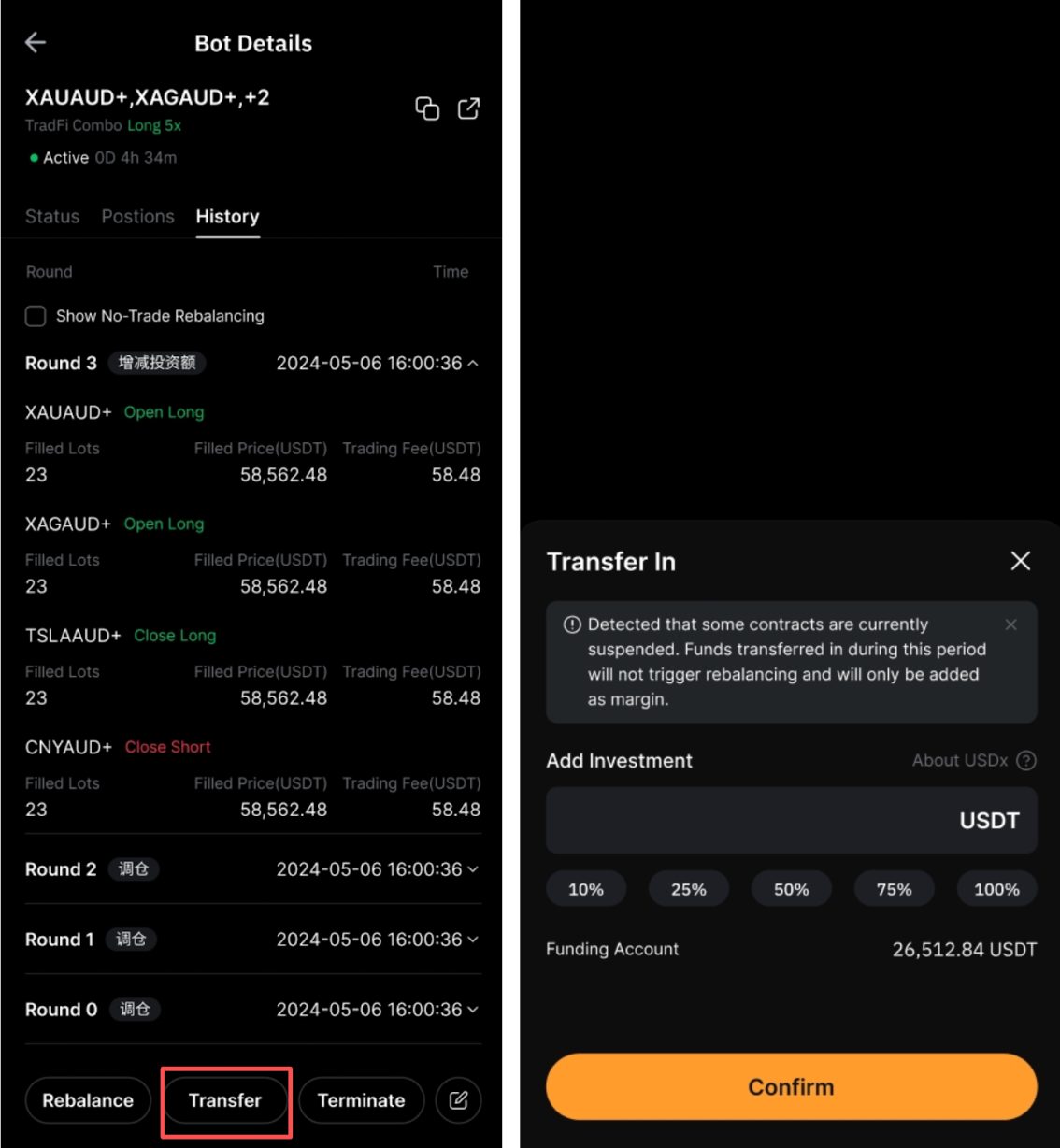
Notes:
— The maximum amount you can add will be calculated as: Maximum investment limit − Current equity
— If any contract in the bot is not tradable due to market closure, added funds will not trigger rebalancing and will be used as margin only.
Withdrawals are not supported while the bot is running. To withdraw funds, you'll need to terminate the bot first. For step-by-step instructions, refer to How to Get Started With the TradFi Combo Bot.
Can I adjust my TradFi Combo Bot parameters?
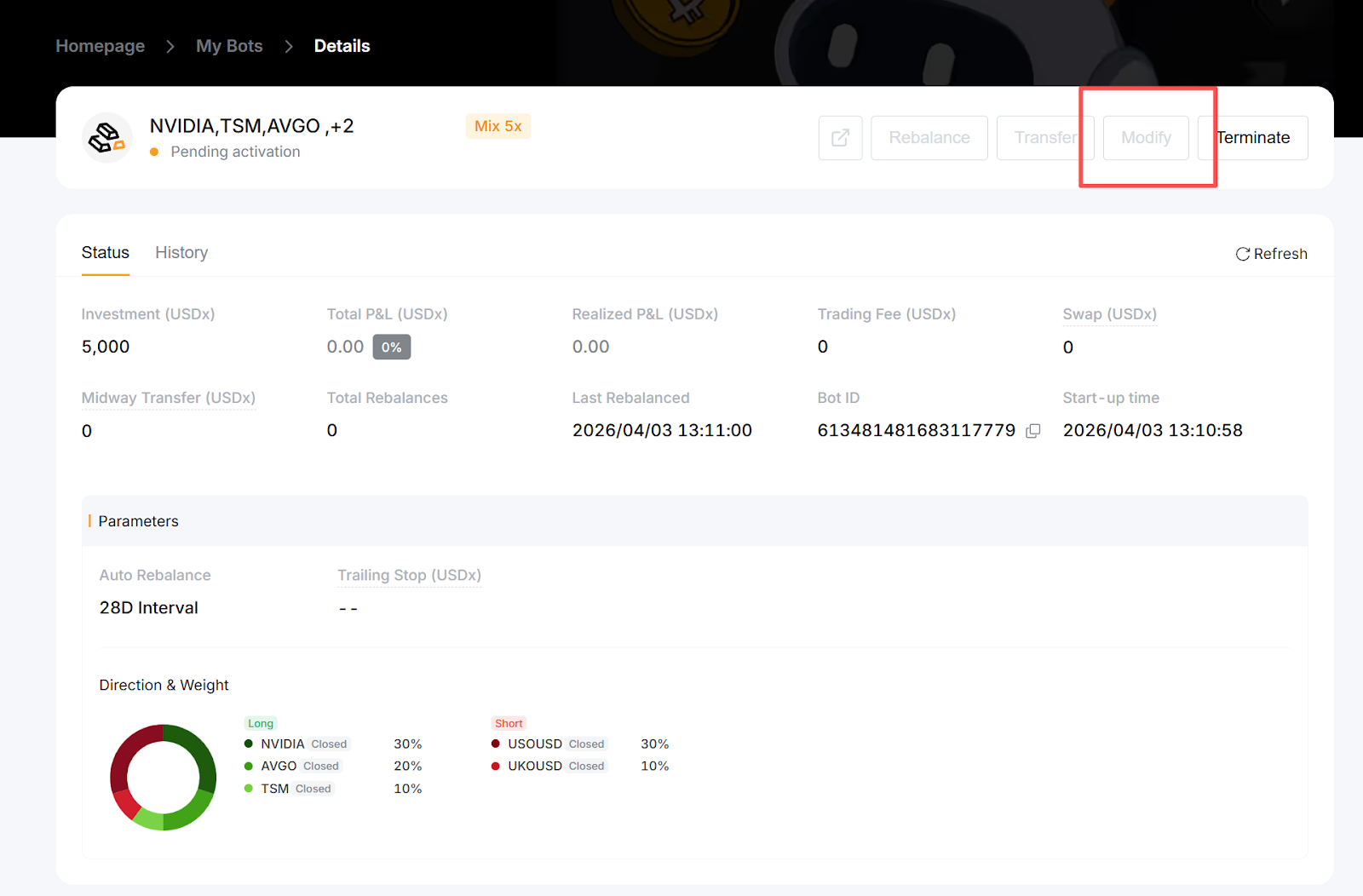
Yes, you can modify the parameters of an active TradFi Combo Bot from the Bot Details page. On the website, simply go to My Bots → Details → Modify.
If you are using the Bybit App, just go to View My Bots, tap the relevant arrow to open the Bot Details, and tap Modify.
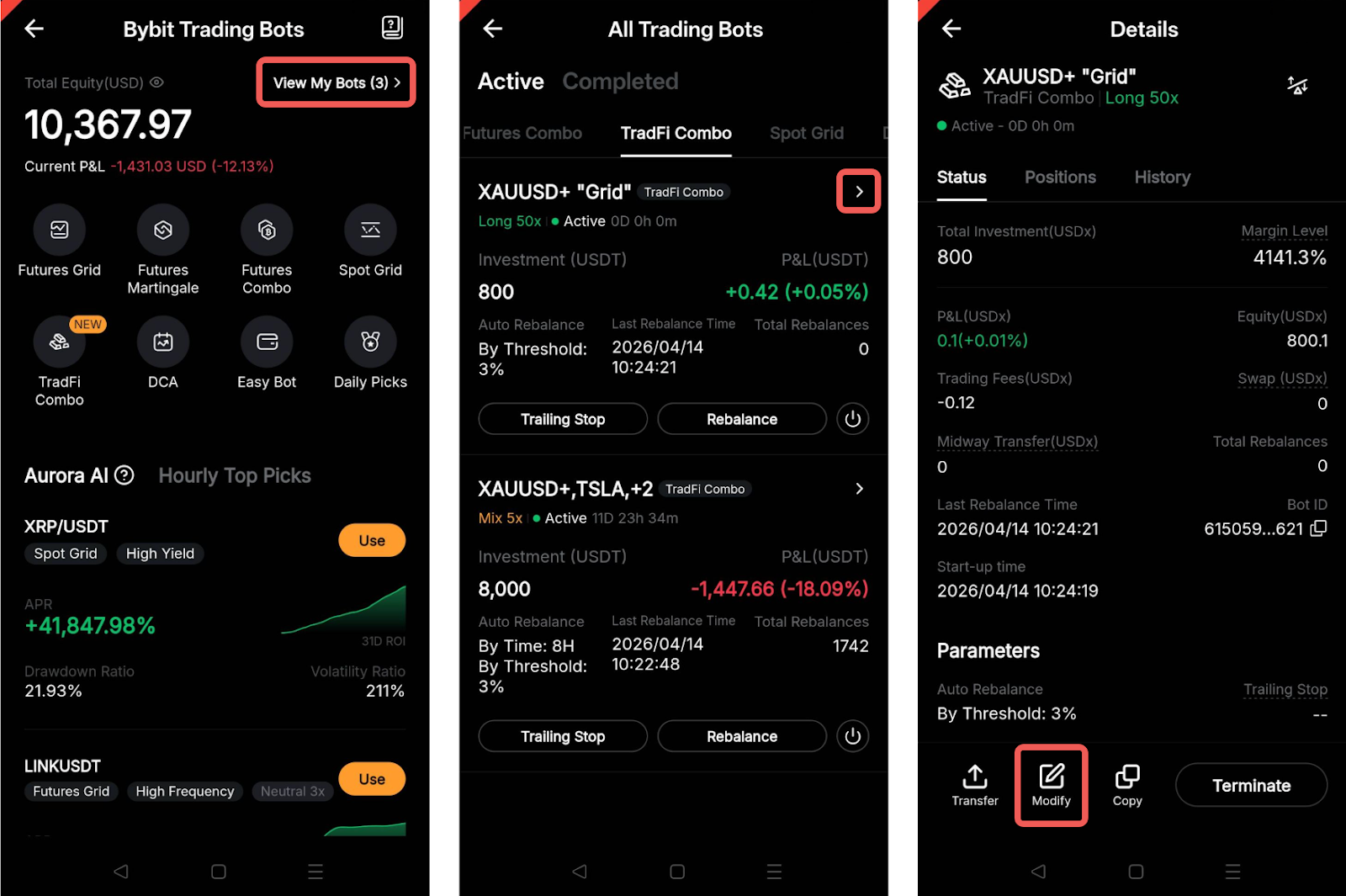
A pop-up window will appear, where you can adjust settings such as the price range (for “Grid”), rebalancing settings, and Trailing Up (optional).
Can I select a contract that is currently not tradable due to market closure when creating my TradFi Combo Bot?
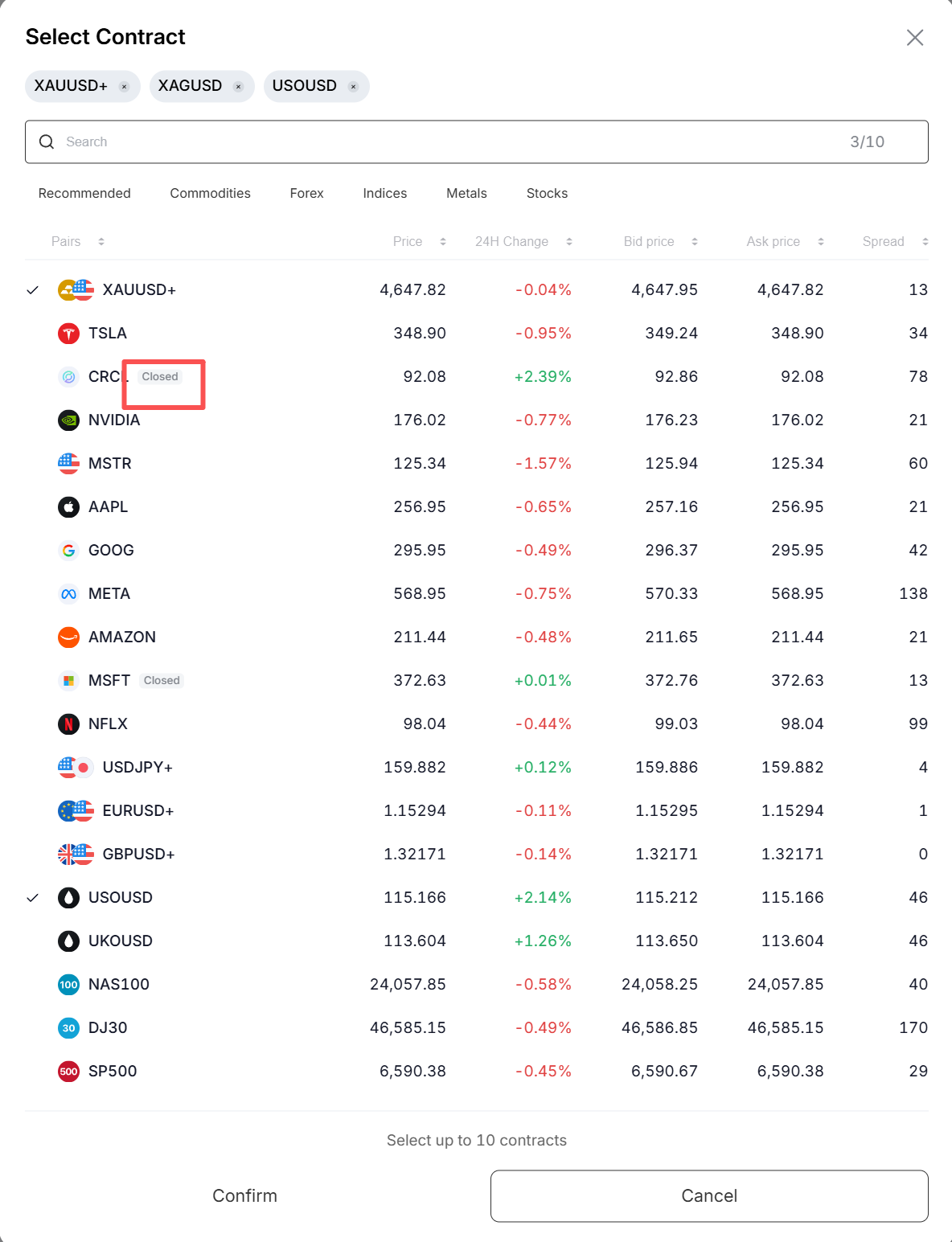
Yes, any contract that is currently not tradable will be marked as Closed on the bot creation page. If you include such a contract, you will receive a notification. The bot will only be created once all selected contracts are available for trading.
When will rebalancing be triggered?
Rebalancing takes place under the following conditions:
- At the scheduled time interval
- When allocations move beyond the set threshold
- When additional funds are added to the bot
You can also manually rebalance your portfolio at any time using the Rebalance button on the Bot Details page.
What happens if the minimum order size is not met during rebalancing?
If the target position size or adjustment amount for any contract falls below the minimum order size during rebalancing, the system will handle it as follows:
Scenario 1: Target position size is below the minimum order size
If the target position size after rebalancing is smaller than the minimum order size, the bot will adjust the position to meet the minimum order size requirement.
Example:
- Min. order size: 1 XAU
- Current position size: 5 XAU
- Target position value: 0.2 XAU
- Target adjustment: -4.8 XAU
- Actual position size after adjustment: 1 XAU
- Actual adjustment: -4 XAU
Scenario 2: Adjustment amount is below the minimum order size
If the required adjustment is smaller than the minimum order size, the bot will not make any changes, as the trade size is too small to execute.
Example:
- Min. order size: 1 XAU
- Current position size: 5 XAU
- Target position value: 4.2 XAU
- Target adjustment: -0.8 XAU
- Actual position size after adjustment: 5 XAU (unchanged)
- Actual adjustment: 0 (no adjustment)
Why didn't my rebalancing go through?
Rebalancing may fail under the following conditions:
- The rebalancing order size is below the minimum or exceeds the maximum allowed limit. Refer to this page for more details.
- The bot has reached its risk limit tier.
Please also note that if one or more contracts in the portfolio are unavailable (e.g., due to market closure), rebalancing will not occur until all contracts are tradable. You can check the trading hours for each contract on this page.
If one contract in my combo is not tradable, will the others still be rebalanced?
No, rebalancing will only take place when all contracts in the combo are available for trading.
What happens if a market closes while my TradFi Combo Bot is running?
You will receive a notification if any contract in your portfolio becomes unavailable due to market closure. During this time, trading and rebalancing will be paused. The strategy will resume automatically once all markets reopen.
If you are using time-based rebalancing and a scheduled rebalancing occurs during market closure, it will be executed once the market reopens. Subsequent rebalancing intervals will be calculated from that execution time.
Example:
If you create a bot at 1AM with an 8-hour rebalancing interval, the first rebalancing would normally occur at 9AM. If the market is closed at that time and rebalancing is executed at 10AM instead, the next rebalancing will occur at 6PM (8 hours from 10AM), rather than 5PM.
What happens if I terminate the TradFi Combo Bot when the market closes?
If you terminate your TradFi Combo Bot during market off-hours, the remaining position will only be closed once the market resumes. Your funds will be transferred back to the Funding account after all orders are filled.
How does the Trailing Stop work?
The Trailing Stop feature automatically adjusts your exit level based on your account's highest recorded equity.
For example, if your equity fluctuates between 500, 450, 600, 900, 800, 1,000, and 800 at different points throughout the week, and you set a 20% retracement rate, your exit equity will be 400, 400, 480, 720, 720, 800, and 800, respectively.
When your account equity drops to 800 (matching the exit equity), the Trailing Stop will be triggered, closing all positions and terminating the bot at the market price. Please note that due to slippage, your final account equity may differ from the exit equity.
Are there situations where my TradFi Combo Bot positions can be liquidated?
Yes, your TradFi Combo Bot positions may be liquidated if your margin level (equity / margin × 100%) falls to the stop-out level of 50%. When this happens, a margin closeout will be triggered, and your bot will be automatically terminated to prevent further losses and maintain sufficient margin in your account.
A liquidation status message will appear in the upper-right corner of the Bot Details page.
For more details, refer to the Liquidation Process on TradFi (Margin Close-Out).
Will trading volume from the TradFi Combo Bot count toward Bybit VIP requirements?
Yes, trading volume generated by the TradFi Combo Bot counts toward VIP requirements in the same way as regular TradFi trading. A 10× multiplier is applied compared to crypto Perpetual contracts.
For example, if you trade $100M using the TradFi Combo Bot, it will be counted as $10M in Derivatives trading volume for VIP qualification.
For more details on the Bybit VIP Program, refer to this article.
What happens if a contract in my TradFi Combo Bot is delisted?
If any contract in your TradFi Combo Bot is delisted, the bot will be automatically terminated.