
General FAQ
What is the Bybit Card?
Bybit Card provides a secure and convenient way to access and spend your crypto anytime, anywhere. It allows you to easily off-ramp your crypto and use earnings from Bybit’s trading products for instant payments in daily life.
With the Bybit Card Loyalty Rewards Program, you can enjoy exclusive partner rewards, special offers, and unique experiences. For more information, please consult the Introduction to Bybit Card Rewards.
What type of card is my Bybit Card and where can I use it?
Illegal use in connection with your Bybit Card is prohibited and may result in termination. To learn more about how to make payments with your Bybit Card, please click here.
Which currencies does Bybit Card support?
The currencies for Bybit Card are composed of one fiat currency and multiple crypto assets. Please find below the list of supported currencies by region.
In what order will the crypto be utilized for my Bybit Card transactions?
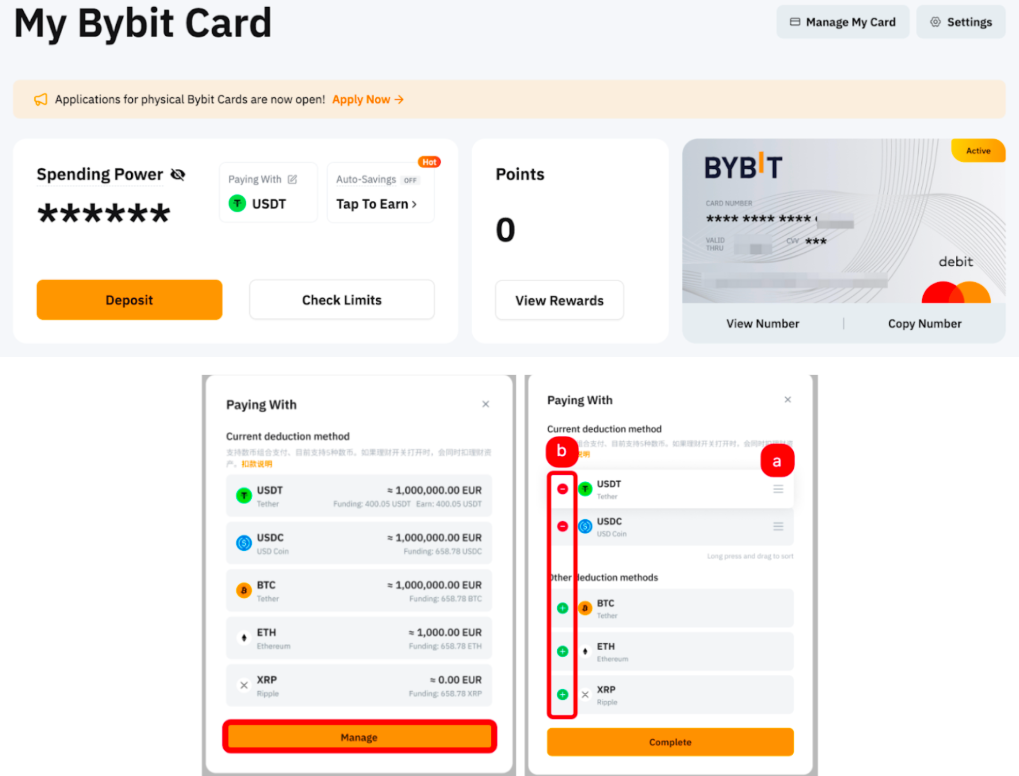
The default payment priority is USDT > USDC > TON > BTC > ETH > XRP. However, you can manage your spending currencies, including adding, removing, or changing the order on the Card Dashboard page.
Click on the Paying With and you will be prompted to a manage window. Then, you can either:
a) Manage the order by dragging it up and down, or
b) add and remove the coins from the list.
Once complete, you can make a purchase using your Bybit Card, the system will follow your customized payment priority.
Can Bybit Card be added to digital wallets like Apple Pay, Google Pay or Samsung Pay?
Please find below which digital wallets are supported for Bybit Card in each region.
Notes:
- At the moment, your Bybit Card can only be linked to Samsung Pay via the Samsung Pay App.
- For a guide on how to bind your Bybit Card to Apple Pay and Google Pay via the Bybit App, please consult this article.
What are the fees associated with Bybit Card?
Please refer to Fees and Limits (Bybit Card) for more information on the different fees applicable on your Bybit Card.
How long is my Bybit Card valid for?
Please find below the validity period for both virtual and physical Bybit Cards in each region.
How can I deposit funds to my Bybit Card?
Bybit Card does not have its own wallet balance. Instead, it derives funds from your Funding Account and Flexible Easy Earn balance. As such, you will need to make sure you have sufficient funds in your Funding Account or Flexible Easy Earn product to use your Bybit Card.
You can deposit funds to your Funding Account by purchasing fiat or crypto using our Buy Crypto function. You can also deposit crypto from other platforms/wallets. A guide on how to buy crypto can be found here.
How can I activate my Bybit Card for overseas transactions?
There is no need to activate your Bybit Card for overseas transactions separately.
However, please note that there are tax charges for the Argentina and Brazil Cards.
What taxes may apply to my Bybit Card transaction?
In some regions, certain taxes may apply when making international transactions or digital service purchases with your Bybit Card. Please find more information in the table below.
Will there be a monthly Bybit Card statement?
No, there will not be any Bybit Card monthly statements provided. However you can export the transaction record on this Data Export page.
How can I upgrade my Bybit Card tier?
Bybit Card tiers are applied on Asia Pacific and Australia Cards. Your Bybit Card tier follows your Bybit account's VIP level. Hence, you can upgrade your Bybit Card tier by upgrading your VIP level. For more information on the Bybit Card benefits for different VIP levels, please check this page.
Will my Bybit Card be temporarily suspended if my Bybit account is suspended?
Your Bybit Card will not be suspended. However, your Bybit Card transactions will fail if your Bybit account is suspended.
Can I change my phone number in the Bybit Card settings?
Yes, the number added to the Bybit Card can be changed and will be utilized for Bybit Card transactions. Please note that it operates independently from your Bybit account.
If you would like to change the mobile number associated with your Bybit account, please refer to this guide.
Are there separate spending limits for my physical and virtual Bybit Card?
Please note that both the Bybit Card spending limit amount settings will depend on the region where your card was issued. Please find below more details on how the spending limits are calculated for your virtual and physical card.
For more information, please refer to the Fees and Limits (Bybit Card).
Can I adjust my Bybit Card spending limits?
Please note that you can only adjust your Bybit Card spending limits if you have an Asia Pacific card. You may upgrade your Bybit Card by clicking on Check Limit on the Bybit Card Dashboard page. For more information, please refer to Fees and Limits.
Physical Card FAQ
Can I apply for a physical Bybit Card ?
Yes, however, you must first obtain a virtual Bybit card before you can apply for a physical card. For more information on Bybit Card applications, please refer to this article.
Notes:
- For the Asia Pacific and Australia regions, users will also be required to verify their residential address.
- Only users from Tier 2 and above are eligible for the Physical Bybit Card Asia Pacific. To learn more about the Tier limits, please visit this page.
- The Physical Card will be rolled out to users in phases and it is not yet available in Peru. If you are not eligible now, please join the waitlist.
When should I activate my physical Bybit Card?
You can activate your physical Bybit Card upon receiving it. To learn more about how to activate your physical card, please refer to this article.
Is there a deadline to activate my physical Bybit Card?
There is no deadline for activating your physical Bybit Card.
What should I do if my Bybit Card is lost or stolen?
Please report your Bybit Card as Lost/Stolen immediately. To learn more about how to process, please refer to Security and Verification.
How do I order a replacement for my physical Bybit Card?
If your physical Bybit Card is damaged/not working, or you have reported the loss of your physical Bybit Card, you can order a replacement for your Bybit Card by following the steps here.
I have previously terminated my physical Bybit Card. Can I re-order it?
You can re-order a new physical Bybit Card if you have previously terminated it. You may refer to the steps here.
How can I withdraw cash from an ATM with my Bybit Card?
You can withdraw cash from ATMs using both your Bybit Physical Card and Virtual Card. However, the supported withdrawal method may vary depending on the card type and the ATM.
- Physical Card: You can withdraw cash from ATMs worldwide that support Mastercard/Visa. Simply look for the Mastercard/Visa logo on the ATM.
- Virtual Card: TM withdrawal availability for Virtual Cards depends on the ATM operator and local network support. You may try using an ATM that supports contactless operations via NFC technology by locating the contactless logo on the ATM. Please note that availability may vary depending on the region and the bank.
Are there any ATM fees and limits for my Bybit Card?
Yes, a 2% ATM withdrawal fee will be charged on any amount exceeding the monthly free withdrawal limit. Bybit Card foreign exchange and/or crypto conversion may also apply (if any). Please refer to the Fees and Limits (Bybit Card) article for a more detailed explanation.
In addition, some ATM merchants may charge an ATM Access Fee and/or may prompt currency conversion to your card currency. Do take note of this and read the instructions on the ATM screen carefully. These are fees and services provided by the ATM service provider.
Why are there only 4-digit PIN code options available when I attempt to withdraw money from any ATM using my Bybit Card?
Please note that all Bybit Cards have a 4-digit pin code, except for Bybit Card Australia which has a 6-digit pin code. Therefore, if you are using a Bybit Card Australia, you might encounter this issue when the settings of the ATM machine in use is displaying a 4-digit pin by default. In such cases, you must continue entering the authorized 6-digit PIN code even though the ATM system only has a 4-digit PIN option to carry out the withdrawal process using Bybit Card.
Can I make contactless payments with my physical Bybit Card?
You can make contactless payments with your physical Bybit Card at retail merchants with contactless-enabled point-of-sales (POS) terminals.
Please note that in order to initiate a contactless payment with Bybit Card Australia and Asia Pacific, you will need to first complete a Chip and PIN transaction (that is, insert the card into a POS terminal and authorize it with your PIN) with your physical Bybit Card.
Moreover, in Europe, the contactless limits under the PSD2 regulation also apply to Bybit Card. Currently, the maximum amount of a single contactless payment is 50 EUR, and the cumulative amount of contactless payments is 150 EUR. Additionally, the maximum number of consecutive contactless payments is 5 times. If you're making a contactless payment in Europe that exceeds these limits, your transaction will be declined. You may reset the limit by performing a Chip and PIN transaction on your next payment, after which, you will be able to make contactless payments again.